Features

Everything you need for creative video mixing

grid_view

8 Video Channels

Load and control up to 8 video files simultaneously with independent playback controls.

swap_horiz

Dual Bank System

A/B bank switching for seamless transitions. Prepare your next clip while the current one plays.

tune

Crossfade Control

Smooth real-time crossfading between banks with an intuitive fader interface.

desktop_windows

Output Node

Dedicated fullscreen output for projection or streaming to external displays.

display_settings

Multi-Output Nodes

Run multiple Output Nodes for backup displays or distributed setups. Master/secondary architecture ensures only one node does the heavy lifting.

folder

Video Library

Organize your media with folders. Drag and drop videos to build your performance library.

image

Thumbnail Previews

Animated sprite sheet previews let you see your clips at a glance before loading them.

devices

Cross-Platform

Available for macOS, Windows, and Linux. Works the same everywhere.

wifi

Network Control

Control from any device on your network. Open Controller Nodes on laptops, tablets, or phones.
Effects Library

17 real-time GPU-powered effects at your fingertips

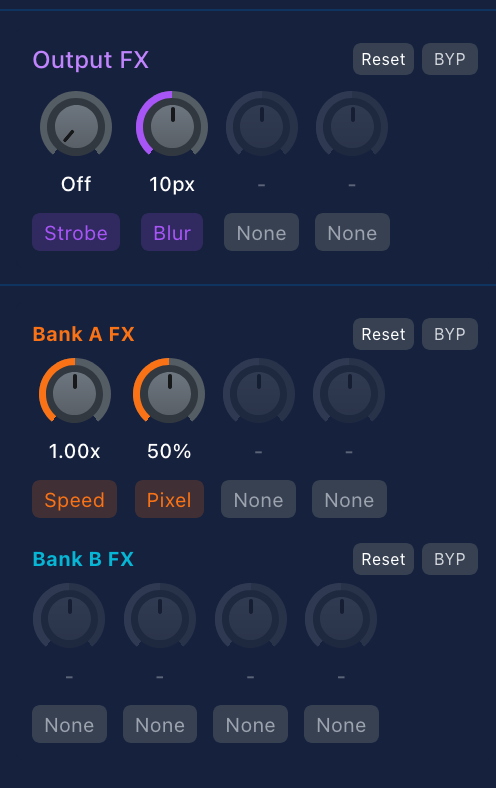
GRID effects panel showing 17 real-time GPU-powered video effects with adjustable parameters

Effects panel with real-time controls

Color & Tone

Brightness Contrast Saturation Hue Rotation Invert Posterize

Stylize

Blur Pixelate Vignette Film Grain

Glitch & Retro

Chromatic Aberration RGB Split Scanlines Strobe
Lite 1 slot per bank
Max 4 slots per bank + 4 output effects

Transitions

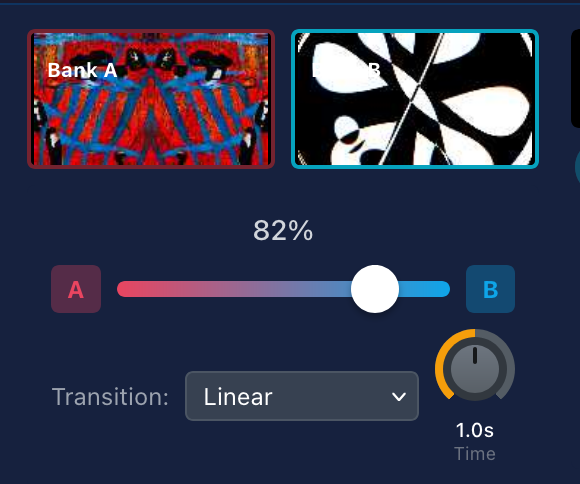
20 transition modes for seamless mixing

layers Blend Modes

  • Linear
  • Luminance
  • Additive
  • Dissolve

swipe_right Wipes

  • Left / Right
  • Up / Down
  • Diagonal (4 directions)
  • Clock Wipe

open_in_full Motion

  • Push Left / Right
  • Zoom In / Out
  • Iris Open / Close

auto_awesome Special

  • Page Turn
  • Cube Rotation
  • Ripple Dissolve
GRID crossfader with 20 transition modes including wipes, dissolves, and motion effects

Crossfader with transition mode selector (0-5000ms duration control)

Masking & Keying

Compositing tools for creative control

colorize

Chroma Key

Remove green or blue screen backgrounds with adjustable similarity and smoothness controls for clean edges.

contrast

Luma Key

Key out dark or light areas based on luminance. Adjustable low/high thresholds with invert option.

shapes

Shape Masks

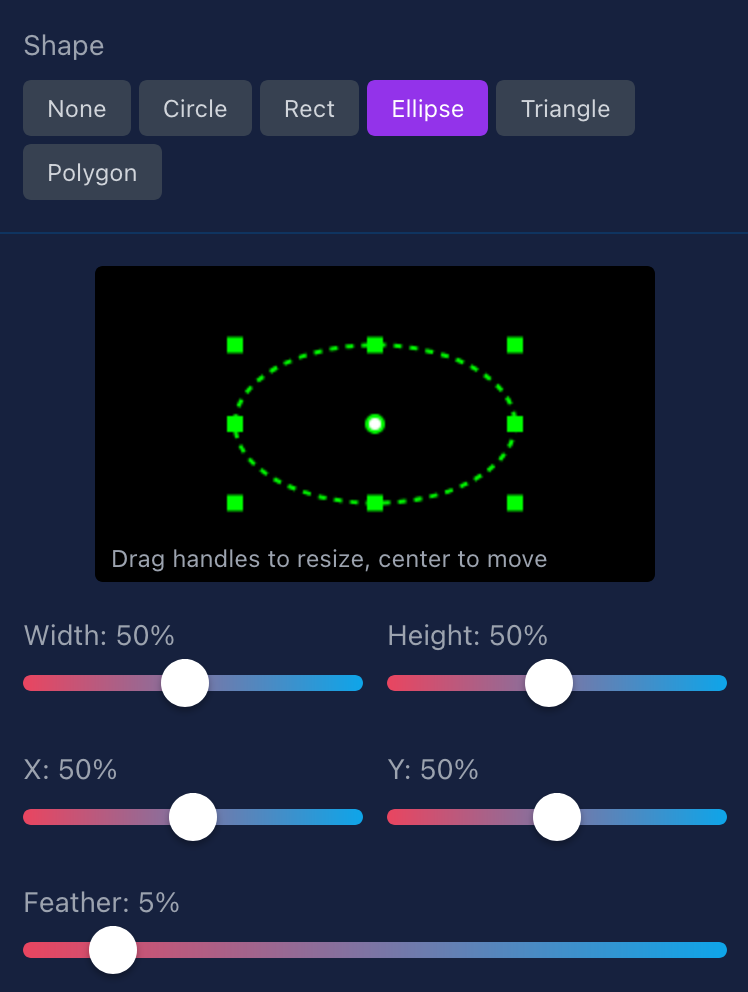
Circle, Rectangle, Ellipse, Triangle, and Polygon masks with up to 16 points. Featherable edges for smooth blends.

stacks

Multi-Layer

Apply masks per-channel for layered compositions. Combine with opacity faders for complex visual blends.

GRID masking interface with chroma key, luma key, and shape mask controls for video compositing

Chroma key and shape mask controls

Audio Mixing

Full audio control with real-time monitoring

volume_up

Per-Channel Volume

Independent volume control for each of the 8 channels

tune

Master Fader

Master volume control with one-click mute toggle

equalizer

VU Meters

Stereo VU meters with real-time peak indicators

speed

Performance Mode

Disable audio processing to save CPU for video-only setups

Keyboard Control

Fast operation for live performance

Grid Navigation

A-I Select column
1-9 Select row
Navigate grid

Channel Assignment

1-8 Assign to channel
Space Quick assign
Enter Confirm selection

Deck Switching

Shift+1 Deck 1
Shift+2 Deck 2
Shift+3 Deck 3

Crossfader

, Auto-fade to Bank A
. Auto-fade to Bank B
? Show help

Hardware Control

Hands-on mixing with physical controllers

piano

MIDI Controller Support

Experimental

Connect any MIDI controller for tactile mixing control. Works with faders, knobs, buttons, and pads.

school
MIDI Learn

Right-click any control, then move your MIDI hardware to map it instantly

tune
Faders & Knobs

Map CC controls to crossfader, channel opacity, volume, and effect parameters

grid_on
Button Triggers

Trigger bank switches, channel loads, and playback with note messages

light_mode
LED Feedback

Controllers with LED rings receive visual feedback for current values

Compatible with: Akai APC Novation Launch Control Korg nanoKONTROL Any MIDI controller
grid_view

Elgato Stream Deck

Experimental

Turn your Stream Deck into a dedicated video mixing surface with visual feedback on every button.

touch_app
Button Mapping

Map buttons to channel loads, bank switches, playback, and effects toggles

image
LCD Feedback

Buttons display video thumbnails, channel states, and active indicators

sync
Encoders

Stream Deck+ encoders control crossfader and continuous parameters

palette
Color Coding

Bank A/B channels light up in matching colors for easy identification

Compatible with: Stream Deck MK.2 Stream Deck XL Stream Deck Mini Stream Deck +
sensors

OSC Control

Experimental

Full Open Sound Control support for tablet controllers, custom interfaces, and integration with other software.

sync_alt
Bi-directional

Receive commands and send state feedback to keep controllers in sync

person_add
Auto-Discovery

Clients auto-register when they send their first message

block
Loop Prevention

Smart routing prevents feedback echoing to the triggering client

timer
Auto Cleanup

Inactive clients timeout after 5 minutes to keep things tidy

Compatible with: TouchOSC Lemur OSCulator Any OSC client
info

Experimental: Hardware support is functional but still being refined. MIDI requires Web MIDI API support (Chrome, Edge, Opera). Stream Deck uses WebHID. OSC runs over UDP on port 9000.