Architecture

Three nodes working together
dns

Server Node

Lightweight

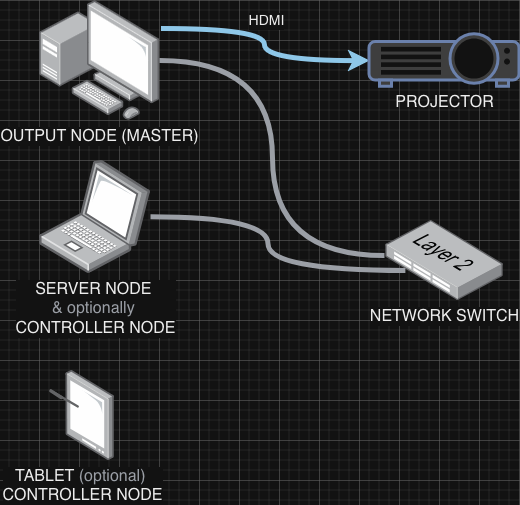
The Server Node manages your video library, generates thumbnails, and synchronizes state between all connected nodes. It handles file management and WebSocket communication.

  • Video file management
  • Thumbnail generation
  • State synchronization
  • Runs on any machine
tune

Controller Node

Lightweight

The browser-based control interface where you select videos, trigger clips, and control the mix. It sends commands to the Server Node but doesn't do heavy processing.

  • Video selection grid
  • Crossfader & effects
  • Works on tablets/phones
  • Multiple Controller Nodes supported
live_tv

Output Node

GPU Intensive

The Output Node performs all video decoding, compositing, and effects rendering in real-time using WebGL. This is where the heavy lifting happens.

  • Real-time video compositing
  • WebGL shader effects
  • 60fps rendering
  • Requires dedicated GPU
  • Multiple Output Nodes: master/secondary mode
tips_and_updates

Tip: Run the Output Node on your most powerful machine with a dedicated graphics card. The Server Node and Controller Nodes can run on any device, including tablets and phones for remote control.

How It Works

Get started in minutes

1

Add Your Videos

Drop video files into the videos folder or upload through the interface. GRID automatically generates thumbnails.

2

Load Channels

Click on any video to load it into one of the 8 channels. Assign channels to Bank A or Bank B.

3

Mix Live

Use the crossfader to blend between banks. Open the Output Node for your projector or capture device.

Tips for Performance

Get the best results from GRID

dns add live_tv

Run Server + Output Nodes Together

For best performance, run the Server Node and Output Node on the same machine. Videos are streamed over HTTP from the Server Node to the Output Node, so localhost connections are instant with no bandwidth limits.

check_circle Zero network latency
check_circle No bandwidth bottlenecks
check_circle Instant video seeking
devices

Control From Anywhere

Controller Nodes only send small WebSocket messages, not video data. Controller Nodes can run on any device on your network - tablets, phones, or laptops.

lan

Separate Machines?

If you need the Output Node on a dedicated media PC, use Gigabit Ethernet minimum (10GbE for 4K). Keep Server Node and Output Node on the same local network, avoid WiFi.

memory

GPU Matters Most

The Output Node does all video decoding and WebGL compositing. A dedicated GPU makes the biggest difference for smooth 60fps playback.

video_file

Optimize Your Videos

Use H.264 codec for best browser compatibility. Match your output resolution - 1080p videos for 1080p output. Consider ProRes for highest quality on macOS.

chrome_reader_mode

Use Chrome

Chrome generally provides the best WebGL performance and video decoding. Enable hardware acceleration in browser settings for optimal results.

display_settings

Multi-Output Node Setup

Run multiple Output Nodes for backup displays. The first Output Node becomes "master" and handles previews/stats; secondaries just render. Change master in Settings if needed.